
Introduction
Most brochures end up in the trash. Not because print doesn't work — but because the design does nothing to earn a second glance.
Small business owners frequently make one of two mistakes: grabbing a generic template that looks like every competitor's handout, or spending hours on a layout that doesn't match their brand. Either way, the brochure fails before it's even read.
A well-designed brochure punches above its weight as a marketing tool. A Canada Post neuromarketing study found that physical mail produced 70% higher brand recall than digital media — and required 21% less cognitive effort to process. The design decisions you make determine whether yours lands in that winning category or the bin.
This guide covers the decisions that separate brochures that work from ones that don't:
- Which brochure format to choose (and why fold type matters)
- The 5 essential parts every brochure needs
- Industry-specific design examples for restaurants, retail, service businesses, and events
- The design mistakes that kill results — and how to avoid them
TL;DR
- Physical brochures beat digital ads on brand recall by a wide margin
- Tri-fold fits most small businesses; bi-fold works better for premium positioning
- Every brochure needs a cover hook, interior flow, credibility panel, and a clear CTA
- Restaurant, retail, and service brochures need fundamentally different design approaches
- Low-res images and missing CTAs are the two most common reasons brochures underperform
Why Small Businesses Still Need Printed Brochures
The Tangibility Advantage
A brochure makes an impression before anyone reads a word. Paper weight, finish, and print quality all signal something about your brand — premium matte stock says one thing, flimsy paper says another.
That sensory experience is something no digital ad can match. The Canada Post study mentioned above also found that physical media held attention 118% longer and drove 29% higher brand recall compared to digital advertising alone. For a small business competing against larger budgets online, that's a genuine edge.
Print Stays Where You Leave It
A social media post is gone in seconds. A brochure can sit on a counter, travel in a bag after a trade show, or get passed to a friend weeks after your event. JICMAIL research shows the average direct mail piece generates 4.56 interactions per item in a single quarter — that's repeated exposure without additional spend.
The Local Marketing Edge
For South Florida businesses targeting a specific neighborhood, event, or customer segment, brochures reach exactly the right audience at the right moment. Local distribution options include:
- In-store displays — placed where customers are already browsing
- Event handouts — trade shows, festivals, and community events
- Direct mail — targeted by ZIP code or neighborhood
- Referral passes — customers share with friends and family
These channels offer geographic precision that broad digital advertising rarely delivers at the same cost. Sergio's Printing also offers Mailing Services, so businesses can print and mail brochures to local recipient lists without managing fulfillment separately.
Brochure Formats: Choosing the Right Fold for Your Business
The fold you choose shapes how much content fits, how the piece gets distributed, and what impression it makes on the reader.
Tri-Fold: The Small Business Workhorse
A standard sheet folded twice creates six panels. Those panels naturally break into three "acts": hook on the cover, information in the middle, action on the back. The finished size fits display racks, #10 envelopes, and event handout bags.
Best for: Service businesses, restaurants, retail promotions, and anything that will sit in a display rack or get handed out at events.
Sergio's Printing offers the 8.5" × 11" tri-fold through their online platform, with direct customization — size, fold, paper weight, and production time — selectable without a phone call or in-store visit.
Bi-Fold (Half-Fold): Room to Breathe
Folding a sheet in half creates four larger panels. That extra space works well for bold photography, detailed service descriptions, or premium client-facing presentations.
Best for: Real estate agents, high-end services, client leave-behinds, and any business where a polished, substantial look matters more than rack compatibility.
Z-Fold and Gate-Fold: For When You Want to Stand Out
- Z-fold (accordion): Panels alternate directions, making it ideal for step-by-step processes, timelines, or multi-service businesses that need a logical sequence
- Gate-fold: Two outer panels open inward to reveal a full interior spread — works well for product launches, event invitations, or premium brand presentations
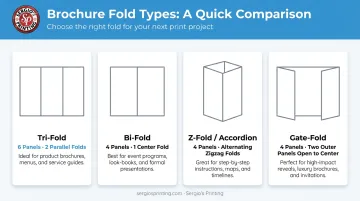
Sergio's Printing carries half-fold, tri-fold, and Z-fold options through their online ordering platform. Gate-fold and letter-fold formats are also available — contact the team directly for custom format guidance.
Choosing the Right Size
Once you've settled on a fold, size is the next call. Here's how common dimensions align with typical use cases:
| Size | Typical Use | Best Fold |
|---|---|---|
| 8.5" × 11" | Standard letter, most versatile | Tri-fold or bi-fold |
| 5.5" × 8.5" | Compact handout or mailer | Half-fold |
| 8.5" × 14" | Legal size, more panel space | Tri-fold or Z-fold |
| 11" × 17" | Large-format, high-impact | Bi-fold |
| 8.5" × 11" (6-page booklet) | Service catalog or program guide | Booklet format |
The rule: let distribution method drive size. If it's going in a display rack, it needs to fit. If it's a mailer, check envelope dimensions. If it's a trade show handout, consider what fits in an event bag.
The 5 Essential Parts of Every Small Business Brochure
1. Cover Panel — The Hook
Your cover functions as a billboard. It needs one strong visual, your logo, and a single compelling headline or tagline — nothing more.
If someone can put it down in three seconds without feeling compelled to open it, the cover needs work. Avoid listing services, hours, or contact details here — that information belongs inside.
2. Interior Panels — The Story
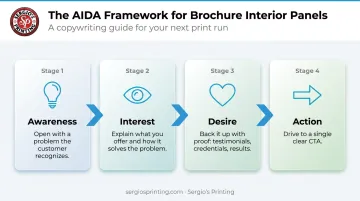
Use the AIDA framework as a guide: Awareness → Interest → Desire → Action. In practice, that means:
- Open with a problem or desire your customer recognizes
- Explain what you offer and how it solves that problem
- Back it up with proof (testimonials, credentials, results)
Each interior panel needs a clear visual hierarchy: bold subheading, supporting copy, and a relevant image or icon. Body copy should be at minimum 12pt. RNIB's clear-print guidelines recommend 14pt for optimal readability — worth keeping in mind when setting type for older audiences.
3. Back Panel — Credibility and Contact
Never leave the back blank. Use it for:
- Phone number, address, and website
- QR code linking to your booking page or site
- Social media handles and hours
- A brief credibility statement (years in business, certifications, or a short testimonial)
Bitly's 2025 survey found 40% of marketers now use QR codes in print ads, and eMarketer reports over 100 million US consumers scan QR codes at least once per year. Adding one to your back panel costs nothing and directly bridges print to digital.
4. Call to Action — The Conversion Trigger
"Contact us" is not a CTA. A real CTA tells the reader exactly what to do and creates a reason to do it now:
- ✅ "Call (305) 971-4161 before Friday for 15% off your first order"
- ✅ "Scan this code to book your free consultation this week"
- ❌ "Visit our website"
- ❌ "Contact us for more information"
One primary CTA, placed prominently. Every other element in the brochure should lead the reader toward it — including your brand presentation.
5. Brand Consistency — The Trust Signal
Fonts, colors, logo placement, and tone must match your website, business cards, and other materials exactly. When a brochure looks off-brand, readers notice — even if they can't articulate why. That friction is often enough to make them set it down rather than act on it.
Small Business Brochure Design by Industry
Effective brochure design is industry-specific. What works for a spa feels wrong for a contractor. Each industry has distinct visual cues, formats, and content priorities that readers recognize — and expect.
Restaurant and Food Business Brochures
Full-bleed food photography carries the design. Images should be professionally shot — not stock — and styled to look like something worth ordering.
What works:
- Warm color palette (deep reds, oranges, earthy neutrals)
- Tri-fold for catering menus or event hosting promotions
- Highlight 3–5 signature items rather than a full menu
- Keep copy minimal — the food image is the message
Sergio's Printing's Food & Beverage template category includes designs like "Delicious Dining" and "Fast Food," giving restaurant owners an industry-matched starting point rather than a blank canvas.
Retail and Beauty/Spa Brochures
Lifestyle photography — the product or service shown in use, not on a white background — outperforms product-only shots. The brochure itself should feel as good as the experience it's selling.
Design priorities:
- Matte or soft-touch finishes add a tactile luxury feel that matches the brand promise
- Include a first-visit offer or seasonal promotion with a QR code
- Soft, clean color palettes (blush, sage, ivory) for beauty; bold and seasonal for retail
The Beauty & Spa and Fashion & Retail template categories at Sergio's Printing include options like "Style Statement" and "Fashion Brochure" — already tuned for these industries.
Service Business and Corporate Brochures
Service businesses need to build trust fast. A headshot of the owner or team humanizes the brand.
What works:
- Clear "what we do / who we serve / why us" structure
- Credentials, client logos, or before/after examples as social proof
- Bi-fold format for a detailed services panel without feeling crowded
- Clean, professional layout — not too clever, not too sparse
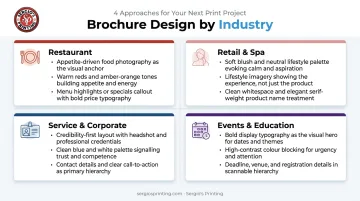
Templates in the Business Service category include "Home Haven," "Business Brochure," and "Corporate" — all structured for credibility-first presentations.
Events, Education, and Community Organizations
These brochures succeed when they lead with outcomes and urgency. Dates, benefits, and a single registration CTA should dominate.
What works:
- Bold event name or program benefit as the headline
- Speaker or instructor photo builds credibility
- Z-fold works well for multi-step schedules or workshop programs
- Single CTA with a deadline: "Register by [date]"
Sergio's Printing's Events & Entertainment and Education & Training categories include templates like "Celebration Chronicle," "Scholar's Sanctuary," and "Education Expo" — solid starting points for organizers who need to move fast without building from scratch.
Key Design Principles That Make Brochures Work
Color, Typography, and Resolution
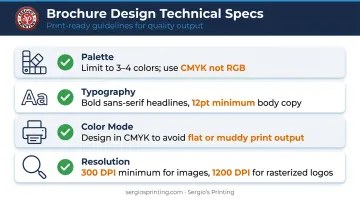
- Palette: Limit to 3–4 colors (brand primary, secondary, one CTA accent). More than that creates visual noise.
- Typography: Pair a bold sans-serif headline font with a clean body font. Body copy minimum: 12pt.
- Color mode: Design in CMYK. RGB colors print flat or muddy — the single most common technical mistake in small business print design. Starting in CMYK eliminates surprises at press.
- Image resolution: All images must be at least 300 DPI at final print size. Web images at 72 DPI will print blurry — no exceptions. Rasterized text or logos should be 1200 DPI for sharp output.
White Space and Visual Hierarchy
Once your technical specs are locked in, layout decisions take over. Crowding every panel is the opposite of professional — white space signals confidence and draws the eye to what matters.
- Place the most important element at the top of each panel
- Use size, weight, and color contrast to signal priority
- Design so a distracted reader absorbs the core message in under 10 seconds per panel
Sergio's Printing requires 300 DPI resolution and a minimum 1/4" margin from trim lines. Both protect your finished piece: sharp images stay sharp, and no critical text gets clipped when the sheet is cut.
Common Brochure Design Mistakes Small Businesses Make
Most brochure problems fall into three categories: too much copy, a missing call to action, or technical print errors that show up only after the job runs. Catching these early saves money and reprints.
Too Much Text, Too Little White Space
A brochure is a teaser, not a manual. If a panel takes more than a few seconds to scan, cut the copy in half. The goal is to spark enough interest to drive the next action — not to answer every possible question. Readers who want more will call or visit.
Weak or Missing CTA
Listing a phone number is not a CTA. A real CTA tells the reader what action to take and why to take it now. Every brochure needs one primary CTA in a high-visibility location. If it's buried in 8pt text at the bottom of the back panel, it won't convert.
Critical Content on Fold Lines and Low-Resolution Images
Two technical mistakes that consistently produce poor print results:
- Placing text or images on fold lines distorts or obscures content during production. Use your printer's template and keep all critical elements inside safe margins — Sergio's Printing requires a 1/8" bleed on all sides with a 1/4" safe zone from the trim line.
- Using low-resolution images (72 DPI sourced from websites) will print blurry. Source 300 DPI files and review a digital proof before approving any print run. Sergio's Printing provides PDF soft proofs before production starts, so there's no reason to skip that step.
Frequently Asked Questions
What are the 5 parts of a brochure?
- Cover panel: hook and brand identity
- Interior panels: core message and services
- Back panel: contact details, QR code, and credibility signals
- Call to action: one clear, specific next step
- Consistent branding: matching fonts, colors, and logo placement throughout
What is the best brochure fold for small businesses?
The tri-fold is the most versatile — it fits display racks, envelopes, and event bags while giving you six distinct panels to work with. Bi-fold suits premium presentations where breathing room and bold visuals matter more than compact distribution.
What size should a small business brochure be?
8.5″ × 11″ is the most common starting size, typically used for both tri-fold and bi-fold formats. Smaller formats like 5.5″ × 8.5″ work well for mailers or compact handouts. Let your distribution method drive the decision.
What information should a small business include in a brochure?
A compelling headline, core service or product descriptions, your unique value proposition, contact details (phone, address, website), a clear CTA, and a QR code to bridge print and digital. Focus on what drives the next action — leave the fine print for your website.
What is the difference between a brochure and a flyer?
A flyer is a flat, single-sheet handout typically used for quick promotional announcements. A brochure is a folded document with multiple panels designed to present a fuller overview of your services, products, or business. Brochures require more engagement but communicate significantly more per piece.