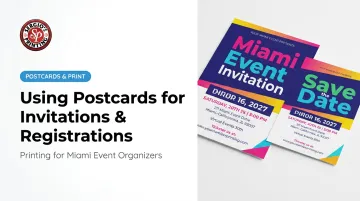
The challenge isn't deciding whether to use postcards. It's designing one that actually drives RSVPs. Too many event postcards end up with cluttered fronts, vague calls to action, or no clear registration path — and the response rate suffers for it.
This guide covers the full process: when postcards make sense, what to prepare before designing, how to build each panel for maximum effect, and the practical steps that turn a good-looking postcard into confirmed attendance.
Key Takeaways
- Postcards outperform email for low inbox engagement, premium events, or community outreach outside your digital list
- Lock in all event details and finalize your mailing list before touching a design tool
- Front panel: visual hook + event name + date
- Back panel: logistics + QR code or URL + RSVP deadline
- Mail 3–6 weeks out; give 6–8 weeks for formal events or anything requiring travel
- Print quality matters — a flimsy postcard undercuts the perceived value of the event itself
When Postcards Work Better Than Digital Invitations
Postcards aren't a universal replacement for email. They're the right tool in specific situations.
Where postcards outperform digital:
- Audiences with lower email engagement (older demographics, community members without active inboxes)
- Events where the physical piece itself signals prestige — a client dinner, a milestone celebration, a charity gala
- Community outreach where you're expanding beyond a digital contact list
- Situations where you need a tangible reminder that stays visible in someone's home
An email gets buried within hours. A postcard on the refrigerator keeps your event date in view for weeks — a passive reminder no digital touchpoint can replicate.
Where postcards underperform:
- Last-minute announcements (printing and mailing require lead time — more on that below)
- Very large untargeted mailings without a segmented list strategy, where postage costs scale quickly
- Events targeting exclusively young, digital-native audiences who are unlikely to act on a mailed piece
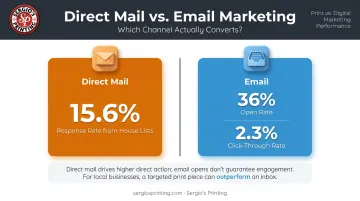
The numbers back this up. According to the ANA Response Rate Report 2023, direct mail to house lists produced a 15.6% response rate. Email house lists may show open rates of 36%, but HubSpot's 2025 benchmarks put average click-through rates at just 2.3% — meaning most opens go nowhere.
What You Need Before Designing Your Event Postcard
Skipping the planning stage is the most common reason event postcards get reprinted — or worse, mailed with errors. Confirm all of the following before opening a design tool:
| Item | Why It Matters |
|---|---|
| Event name, date, time, venue, address | Any change after print approval means a reprint |
| Finalized mailing list with postal addresses | Determines quantity, budget, and whether you need variable data printing |
| Postcard size decision | Affects design space, postage class, and visual impact |
| RSVP or registration method | QR code, URL, phone, or mail-back — this determines how much back-panel space you need |
That mailing list row deserves extra attention. Address accuracy directly affects deliverability — USPS requires addresses to be updated within 95 days before mailing for presorted and automation pricing, per USPS Move Update standards. Running your list through an address validation tool before printing prevents returned mail and keeps your per-piece cost from going to waste.
How to Design an Event Invitation Postcard Step-by-Step
Effective event postcards follow a consistent two-panel structure: the front earns attention, the back earns action. Missing either side weakens your response rate.
Front Panel: Visual Hook and Event Identity
The front panel has one job — stop the recipient from setting the postcard aside. Every design decision should serve that goal.
What belongs on the front:
- Event name (prominently, in readable type)
- A strong visual: event photo, branded illustration, or thematic design
- The single most important logistical detail — almost always the date
What doesn't belong on the front: sponsor logos, full agendas, lengthy descriptions, or contact details. All of that goes on the back. Crowding the front reduces visual impact and makes the piece feel cheap.
One common mistake: using a generic stock photo with no connection to the event's brand or theme. It signals low effort before the recipient has read a word.
Back Panel: Logistics, Registration, and Compliance
The back panel is where recipients decide whether to register. Give them everything they need, organized clearly.
Required elements:
- Full event date and time
- Venue name and complete address
- RSVP deadline (with a specific date, not "soon")
- Registration method — QR code, URL, or phone number
- Sender's return address (upper left per USPS guidelines)
- Reserved space for delivery address and postage (right side of the back panel)
QR codes on the back panel connect the physical postcard directly to your digital registration form. Scanning a code takes three seconds; typing a URL takes longer and invites errors.
If you include a QR code, test it on multiple devices before the print run. A broken QR code on 2,000 postcards is an expensive mistake with no easy fix.
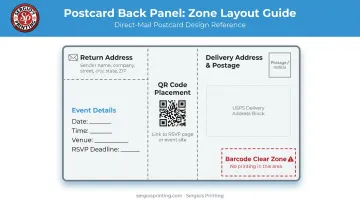
Position the QR code away from the USPS barcode clear zone (lower right of the address side) — placing anything there can interfere with automated mail processing and cause delivery problems.
Selecting Size, Paper, and Finish
Size affects both design flexibility and postage cost:
| Size | Postage Class | Best For |
|---|---|---|
| 4×6" | USPS postcard rate ($0.61 retail) | High-volume mailings, budget-conscious events |
| 5×7" | Letter rate | More design space, moderate premium feel |
| 6×9" | Letter or flat rate | Premium events, complex logistics, maximum visual impact |
Per USPS Business Mail 101, postcards qualify for the postcard rate only when they fall between 3.5×5" minimum and 4.25×6" maximum. Anything larger is billed at letter or flat rates — worth knowing before finalizing your size.
For paper and finish: heavier cardstock signals quality before the postcard is read. A thin, limp postcard undercuts event credibility before anyone reads the details. Sergio's Printing produces event postcards on 14pt card stock with UV coating options in sizes from 4×6 up to 6×9 and beyond — so organizers can match the finish to the event without juggling multiple vendors.
Where Postcard Invitations Make the Biggest Impact
Postcards work best when the event type and the audience both call for something tangible. These categories tend to get the strongest response:
- Corporate product launches and client events — a mailed piece signals professionalism in a way that a calendar invite doesn't
- Weddings and milestone celebrations — the occasion's formality calls for something physical; digital-only invites feel mismatched
- Community events and nonprofit fundraisers — postcards reach people outside your email list, expanding the potential audience beyond your existing contacts
- Educational workshops, church events, and local classes — audiences with established postal communication habits respond well to physical outreach
Distribution method varies by event type. Corporate and private events typically mail directly to a curated list, so the design needs a clear address block and follows standard direct-mail specs.
Public community events often rely on bulk hand-distribution — placed at complementary venues, community boards, or local businesses. That approach drops the address block entirely and usually calls for higher quantities at a lower per-unit cost.
Best Practices for Driving RSVPs and Registrations
Keep the Message Focused
Every element on the postcard should point toward one action: register, RSVP, or show up. If your postcard includes sponsor logos, full event agendas, and three paragraphs of background — you've diluted the call to action. Cut anything that doesn't directly support attendance.
Set a Specific RSVP Deadline
"RSVP soon" doesn't motivate action. "RSVP by March 14" does. A visible deadline creates urgency and gives you a reliable headcount window. Put it on the back panel where it's impossible to miss — not in fine print.
Mail With Adequate Lead Time
Recommended lead times, based on Emily Post invitation timing guidelines:
- Casual community events: 2–3 weeks before
- Corporate events and formal gatherings: 3–6 weeks before
- Weddings: 6–8 weeks before (earlier if destination travel is involved)
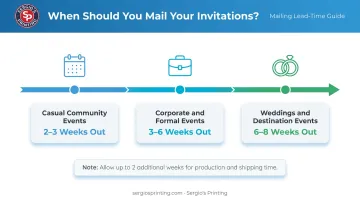
For customers outside Miami-Dade County ordering from Sergio's Printing, account for 3–4 business days of standard production plus 5–7 business days of shipping. That's up to two weeks before a recipient holds your postcard, so build that window into your event timeline.
Coordinate With a Digital Touchpoint
A recipient who misplaces the postcard shouldn't lose the ability to register. A follow-up email, event page, or social post using the same visual branding reinforces recognition and gives people a second path to RSVP. When the postcard and digital touchpoint look identical, recipients are more likely to trust the event is legitimate and take action.
Frequently Asked Questions
What are common postcard design mistakes?
The three most frequent: overcrowding the front panel with text that should live on the back, omitting a clear RSVP method or deadline, and using low-resolution images that print blurry. For quality printing, images should be at least 300 dpi.
What are the USPS rules for postcards?
To qualify for postcard postage rates, a piece must be 3.5×5" to 4.25×6" with a minimum thickness of 0.007", and the back must reserve space for the delivery address, return address, and postage. Anything larger is charged at letter or flat rates.
How far in advance should you mail event invitation postcards?
For most events, 3–6 weeks before the event date. For formal events, weddings, or anything requiring travel, 6–8 weeks is the safer window. Factor in production and shipping time when counting back from your event date.
What size postcard is best for event invitations?
4×6" is the most common choice — it qualifies for the lower USPS postcard rate and handles most invitations well. For events with complex logistics or a premium feel, 5×7" or 6×9" gives you more design room.
Can you use a postcard to collect event registrations?
Yes. Include a QR code or short URL that links directly to an online registration form. For smaller or more formal events, a tear-off reply section for mail-back RSVPs is another option. QR codes are generally easier to track and act on quickly.
Do mailed event postcards need to follow USPS guidelines?
Any postcard going through USPS must meet size, thickness, and address-block requirements. Non-compliant pieces may be returned or charged additional postage. If you're unsure whether your design meets postal requirements, a printer like Sergio's Printing can review your layout before you go to press.