But the printer you choose matters more than most businesses realize. Pick the wrong one and you're looking at thin cardstock that feels cheap, color that doesn't match your brand, or a turnaround time that blows your campaign deadline. This guide breaks down five top commercial postcard printers — what each does well, where each falls short, and how to match the right printer to your actual needs.
Key Takeaways
- Direct mail delivers strong ROI, and postcards remain one of the most accessible formats for small-to-mid-sized businesses
- Top printers covered: Sergio's Printing, GotPrint, PrintingForLess, Vistaprint, and UPrinting
- Key selection factors: paper weight (14 pt vs. 16 pt), coating type, minimum order quantity, and design support
- Businesses without in-house designers should prioritize printers with editable templates and bilingual support across multiple industry categories
Why Commercial Postcard Printing Still Matters
Commercial postcard printing means professional-grade output from offset or digital presses — not your office printer or a consumer photo service. The difference shows up immediately: sharper color, heavier cardstock, and coatings built to survive the mail stream.
The numbers make the case. The ANA reported that postcards sent to house lists produced 92% ROI, while direct mail overall outperformed both SMS (102% ROI) and email (93% ROI). Separately, Lob's 2024 State of Direct Mail Marketing found that 84% of marketers agree direct mail delivers the highest ROI of any channel — and 82% increased their direct mail spend that year.
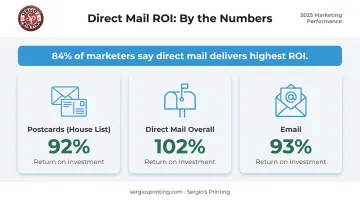
Those figures explain why postcard campaigns keep growing even as digital ad costs climb. The real decision is which printer delivers the best output for your budget and timeline — and that's what the sections below are for.
Top 5 Commercial Postcard Printers
These printers were evaluated across six criteria:
- Print quality and color accuracy
- Sizing variety and paper stock options
- Turnaround speed and rush availability
- Pricing transparency
- Design support and template resources
- Customer satisfaction ratings
Sergio's Printing
Sergio's Printing is a Miami-based full-service commercial print shop with 30+ years of operating history, offering postcard printing through both an in-store location and a fully functional online platform. What sets it apart for small and mid-sized businesses is the combination of an extensive template library and a bilingual design interface — customers can customize postcards in English or Spanish without needing a graphic designer on staff.
Postcard orders start at 100 units, with quantity tiers up to 25,000. All postcards are printed on 14 PT cardstock with optional UV coating, and full-color printing on both sides (4/4) is standard. Three ordering pathways are available:
- Browse and customize a pre-built template
- Upload print-ready artwork directly
- Build a design from scratch in the online studio
| Feature | Details |
|---|---|
| Postcard Sizes | 30+ sizes including 4"×6", 5"×7", 5.5"×8.5", 6"×9", 6"×11", and up to 8.5"×11" — horizontal, vertical, and square orientations available |
| Design Support | Online customizable templates across 16+ industry categories; bilingual platform (English/Spanish) |
| Paper Stock | 14 PT cardstock; UV coating available |
| Minimum Order | 100 units |
| Best For | Small businesses, multi-industry campaigns, bilingual markets, teams without in-house design resources |
Sergio's holds a 4.9-star rating from 250+ verified Google reviews. For businesses in Miami-Dade County, in-store pickup and local delivery are available — an advantage when turnaround time is tight.
GotPrint
GotPrint is a California-based online commercial printer known for volume pricing and one of the broadest size selections in the market. It's a go-to for marketing agencies and businesses running high-volume direct mail campaigns where per-piece cost matters.
| Feature | Details |
|---|---|
| Postcard Sizes | 30+ sizes including 4"×6", 5"×7", 5.5"×8.5", 6"×9", and formats up to 9"×12" |
| Paper Stocks | 14 pt gloss, 14 pt uncoated, 16 pt premium matte, 18 pt premium kraft, Trifecta stocks (24–38 pt), 13 pt premium linen |
| Coatings | High Gloss UV; specialty raised UV and raised foil on select stocks |
| Turnaround | Standard 2–6 business days production; rush and express options available |
| Starting Price | 4"×6" postcards from $26.40 |
| Best For | High-volume campaigns, agencies, businesses prioritizing stock variety and competitive volume pricing |
GotPrint's Trifecta stock (a thick double-sided matte option) stands out for brands that want a premium feel without paying specialty printer prices.
PrintingForLess
PrintingForLess (PFL) is a Montana-based commercial printer built for brands that prioritize output consistency and direct mail coordination. Its strongest differentiator is full-service mailing: PFL operates as a mailing house, managing printing and USPS coordination in-house.
| Feature | Details |
|---|---|
| Postcard Sizes | Standard: 4.25"×5.5", 4"×6", 5"×7", 5.5"×8.5", 6"×9", 6"×11"; custom sizing also available |
| EDDM Sizes | 4.25"×10.625", 4.25"×15", 6.25"×9", 6"×11" |
| Paper Stocks | 14 pt and 18 pt; gloss, dull/matte, or uncoated finishes; recycled paper options |
| Notable Feature | Full-service EDDM and direct mail fulfillment; in-house design team available |
| Best For | Brands and agencies running coordinated direct mail campaigns where print + mail fulfillment in one place matters |
PFL handles EDDM route selection, can mail part of an order while shipping the remainder, and offers custom sizing beyond standard postcard dimensions. Pricing is quote-based, so it fits mid-to-large runs best; smaller one-off orders may prefer a printer with fixed upfront pricing.
Vistaprint
Vistaprint is the most recognizable name in online printing for small businesses and solo entrepreneurs. Its appeal is low minimums, a large free template library, and the ability to bundle postcards with other marketing materials in one order.
| Feature | Details |
|---|---|
| Postcard Sizes | 4"×4", 4.2"×5.5", 4"×6", 5"×7", 5.5"×8.5", 6"×6", 6"×9", 6"×11" |
| Minimum Order | 25 pieces |
| Paper Options | 14 pt standard; 16 pt and 18 pt premium; glossy, matte, soft touch, recycled, linen, kraft, and specialty foil options |
| Turnaround | 2-day postcards available; standard mailing services up to 7 business days |
| Best For | Startups and small businesses needing low quantities with minimal design experience |
The 25-piece minimum makes Vistaprint practical for testing new designs or running hyper-targeted campaigns. The trade-off is less control over color accuracy and stock specifications compared to specialty commercial printers.
UPrinting
UPrinting is a Los Angeles-based online printer with one of the widest finish selections available , making it a strong choice for businesses with ready-to-print files who want maximum control over how the final card looks and feels.
| Feature | Details |
|---|---|
| Postcard Sizes | 9 standard sizes including 4"×6", 5"×7", 5.5"×8.5", 6"×9", and up to 6"×11" |
| Paper Stocks | 10 pt, 14 pt, 16 pt, 17 pt; gloss, matte, silk, soft touch, uncoated, and High Gloss UV options |
| Minimum Order | 25 pieces (standard); 250 pieces for folded, EDDM, and die-cut formats |
| Turnaround | As fast as 1 business day; standard 1–3 business day fast turnaround options |
| Direct Mail | Available at 250+ quantity; adds 2–3 business days |
| Customer Rating | 4.5/5 on Trustpilot from ~2,296 reviews |
| Best For | Businesses with print-ready files who want finish variety and fast turnaround |
UPrinting's soft-touch matte and silk lamination options are particularly effective for luxury or lifestyle brands where tactile impression matters.
How to Choose the Right Commercial Postcard Printer
The most common mistake is choosing a printer based on price alone. A postcard printed on thin, uncoated stock may cost less per piece — but it signals low quality the moment it lands in someone's hands. That undermines everything else the campaign is trying to do.
Paper Weight and Coating
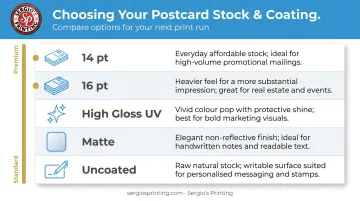
- 14 pt cardstock is the industry standard for most postcard campaigns — cost-effective, sturdy, and mail-compatible
- 16 pt cardstock feels noticeably more premium; worth the upgrade for high-value audiences (real estate, financial services, luxury retail)
- High Gloss UV delivers vivid color and a protective finish — best for image-heavy designs
- Matte coating reduces glare and reads as more sophisticated — better for text-heavy or minimalist designs
- Uncoated stock is writable, useful if recipients need to fill something in or the postcard doubles as a reply card
Turnaround Time
Production time and shipping time are separate. A printer advertising "5-day delivery" may mean 5 days in production plus 3–5 days shipping. Always confirm:
- When does the production clock start? (Usually after proof approval and payment)
- Is rush production available, and what does it cost?
- For time-sensitive promotions, factor in 2–3 business days of buffer
Design Support
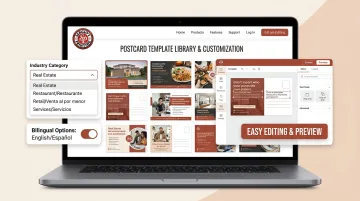
Businesses without in-house designers should prioritize printers that offer editable templates.Sergio's Printing, for example, offers browser-based templates across 16+ industry categories in both English and Spanish — customers can customize designs directly online or upload a print-ready file, no design software required.
Pricing Structure
Per-piece costs drop sharply at higher quantities. As a general pattern across the market:
- Low volumes (100–250 units): higher per-piece cost, digital printing
- Mid volumes (500–2,500 units): meaningful cost reduction kicks in
- High volumes (5,000+ units): offset printing economics make per-piece costs significantly lower
Always request itemized quotes at your exact quantity. Stock type, coating, and size all affect per-piece cost, and the differences between printers are most visible at the line-item level.
Getting the Best Results from Your Postcard Print Run
File Preparation Basics
Getting your files right the first time avoids costly reprints. Sergio's Printing's pre-press specs follow standard commercial printing requirements:
- 300 DPI resolution for photos and graphics (1200 DPI for rasterized text or logos)
- CMYK color mode — RGB files will shift in color during printing
- 0.125" bleed on all sides (for a 4"×6" postcard, submit artwork at 4.25"×6.25")
- 1/4" safe margin — keep all text and critical elements away from the trim edge
- Request a PDF proof before approving final production
Bleed errors are the single most common cause of reprints. When background images or colors extend to the edge of the card, the file must include bleed — otherwise you'll see white borders after trimming.
Choosing the Right Size
| Size | Best Use | USPS Rate |
|---|---|---|
| 4"×6" | Cost-efficient, high-volume campaigns | Postcard rate eligible |
| 5"×7" | More visual impact, moderate volume | Letter rate required |
| 6"×11" | Maximum visual presence, oversized mailers | Letter rate required |
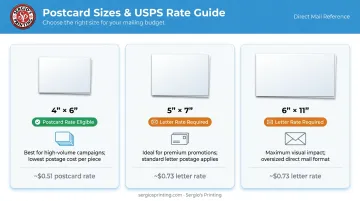
USPS postcard-rate eligibility has a strict size ceiling: no larger than 4.25" high × 6" long × 0.016" thick. Only the 4"×6" format (at standard thickness) qualifies. Any larger size requires a letter-rate stamp, so factor that added cost into your budget before committing to a format.
USPS Mailing Specs
Before you mail, confirm your postcards meet these USPS requirements:
- Thickness must fall between 0.007" and 0.016" for postcard-rate eligibility
- CASS certification on your address list improves ZIP Code accuracy and can reduce return mail
- EDDM (Every Door Direct Mail) lets you target every address on a mail route without a list — useful for neighborhood-based campaigns
- Confirm with your printer whether mailing services are included or priced separately
Conclusion
The right commercial postcard printer depends on your volume, design capabilities, quality expectations, and turnaround needs. The best-known name isn't always the best fit. Here's a quick way to think about it:
- High-volume agencies tend to benefit most from GotPrint's stock depth
- Direct mail campaigns with USPS integration are well-served by PrintingForLess
- Small businesses testing low-quantity runs can start cost-effectively with Vistaprint
For businesses that need professional templates, bilingual support, flexible sizing, and an online platform that doesn't require design experience, Sergio's Printing is a strong match. Browse 16 industry-specific postcard templates, choose from 4×6 or 5×7 sizing, and order in English or Spanish at sergiosprinting.com.
Frequently Asked Questions
What is the standard size for commercial postcards?
The most common sizes are 4"×6", 5"×7", and 6"×11". Only 4"×6" qualifies for USPS postcard postage rates — larger formats require letter-rate postage, which adds to mailing costs.
How much does commercial postcard printing typically cost per piece?
Per-piece pricing varies by quantity, stock, and finish — costs drop significantly at 5,000+ units versus low volumes. Sergio's Printing starts at $29.99 per 100 postcards; GotPrint's 4"×6" pricing starts at $26.40 for entry-level quantities.
What paper stock is best for professional postcard printing?
14 pt cardstock is the standard for most campaigns — durable and cost-effective. Upgrade to 16 pt for a noticeably premium feel. Gloss UV works best for image-heavy designs; matte is better for text-heavy or upscale aesthetics.
What is the difference between offset and digital postcard printing?
Digital printing suits short runs with fast turnaround and works well for variable data. Offset printing delivers better color consistency and lower per-piece cost at high volumes — typically the better choice at 2,500+ units.
How do I make sure my postcard design is print-ready?
Files should be 300 DPI, CMYK color mode, with a 0.125" bleed and all text kept at least 0.25" from the trim edge. Always request a PDF proof before approving final production to catch any color or layout issues.
Can I order postcards in small quantities from a commercial printer?
Yes — Vistaprint and UPrinting both start at 25 pieces, while Sergio's Printing starts at 100. Per-piece costs are higher at low volumes, but online platforms with ready-to-use templates make small runs straightforward to order.