The direct mail print process is a five-stage production workflow: design, preflight/pre-press, printing, finishing, and mailing. Each stage feeds the next, and decisions made in stage one (paper weight, dimensions, color mode) have real consequences on postage costs and deliverability in stage five.
According to the ANA's 2023 Response Rate Report, direct mail delivers a 161% ROI for house lists and a 15.6% average response rate — figures that justify the production investment when the process is executed correctly.
This guide walks through every stage of that process, the factors that affect quality and cost, and the misconceptions that cause the most problems.
Key Takeaways
- The direct mail print process has five stages: design, preflight/pre-press, printing, finishing, and mailing.
- Digital printing works best for short, personalized runs; offset becomes more cost-effective at roughly 10,000+ pieces.
- Paper stock, color mode, dimensions, and finishing all affect print quality — and your postage costs.
- Skipping or rushing preflight is the most common cause of print errors, delays, and rework.
- Knowing the workflow lets you brief your printer accurately and keep the project on budget and on schedule.
What Is the Direct Mail Print Process and Why It Matters
The direct mail print process is the structured production sequence through which physical marketing materials — postcards, brochures, self-mailers, envelope packages — are designed, prepared, printed, finished, and delivered to a targeted mailing list.
It differs from standard commercial printing in one key way: every piece must also comply with USPS postal regulations. Size, weight, aspect ratio, address block placement, and sealing requirements all affect whether a piece qualifies for the intended mail class and rate.
Most businesses treat direct mail printing as a simple transaction: send the design, receive the prints. What they miss is that decisions made early in production directly affect postage rates, deliverability, and campaign results.
A few examples of how this plays out:
- Choosing a heavier paper stock adds tactile appeal but can push the piece into a higher postage tier
- Designing to the wrong dimensions may disqualify the piece from automation pricing
- Submitting an RGB file instead of CMYK causes color shifts that no amount of approval can fix after the fact
Getting familiar with each production stage — before files go to print — is how businesses avoid costly surprises and get the most from their direct mail budget.
How the Direct Mail Print Process Works: Step by Step
Step 1: Concept Development and Design
This stage defines the campaign goal, target audience, format (postcard, self-mailer, brochure, envelope package), and visual layout. Design decisions must account for production requirements, not just aesthetics — this distinction trips up more campaigns than any other single factor.
Piece dimensions, for instance, need to be confirmed against USPS size standards before a designer starts building layouts — not after. A postcard sized at 6.5" x 9" qualifies as a flat and carries a higher postage rate than a standard-size postcard.
Starting from production-ready templates eliminates most of this risk upfront. Sergio's Printing's design tool offers postcard templates in 4×6 and 5×7 formats across 16 industry categories — from food service and real estate to beauty and events — with bleed, safe zone, and trim dimensions already set correctly for print.
Step 2: Preflight and Pre-Press
Preflight is the technical review that confirms a design file is actually ready to print. A file that looks clean on screen can still fail in multiple ways:
- Images below 300 DPI — appear sharp on monitor, print blurry
- Colors in RGB mode — converts unpredictably to CMYK at press
- Missing bleeds — leaves white borders where full-bleed design was intended
- Fonts not embedded — may substitute or reflow on a production system
- Incorrect file format — anything other than a print-ready PDF with embedded fonts creates risk
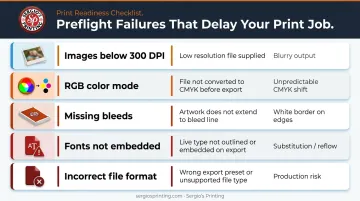
According to GWG, preflighting PDF files can save significant money because many errors are only detectable by preflight software and will cause problems later in production.
Pre-press also includes USPS compliance checks — confirming piece dimensions, weight class, and address block placement meet postal standards for the intended mail class before plates are made or digital files are queued.
Step 3: Print Method Selection and Production
Two methods handle the majority of direct mail production:
| Factor | Digital Printing | Offset Lithography |
|---|---|---|
| Setup | No plates required | Plates + make-ready required |
| Run length | Short runs (under ~10,000) | Cost-effective above ~10,000 pieces |
| Personalization | Supports variable data (VDP) | Not suited for per-piece variation |
| Turnaround | 3–7 business days (typical) | 7–15+ business days |
| Per-unit cost | Higher at volume | Lower at volume |
The right choice depends on quantity, whether personalization is needed, and turnaround requirements. Xeikon's direct mail analysis places the offset cost-efficiency threshold at roughly 10,000 pieces — treat that as a planning benchmark, not a universal rule.
Step 4: Finishing
Finishing covers everything that happens after the sheet leaves the press:
- Cutting and trimming to final dimensions
- Scoring and folding for self-mailers and brochures
- Coatings — aqueous, UV, soft-touch, matte, or gloss — to protect and enhance the surface
- Bindery operations — gluing, perforating, tabbing
For self-mailers, USPS compliance doesn't end at dimensions. Per USPS QSG 201b, folded self-mailers must be sealed with tabs, wafer seals, glue strips, or tape — open-edge pieces will be rejected. Minimum paper basis weight for self-mailers is 70 lb book stock up to 1 oz, and 80 lb book over 1 oz.
Finishing choices also affect recipient experience. A Canada Post neuromarketing study found direct mail held attention for an average of 37 seconds, with 66% brand recall — physical quality, including coating and stock weight, contributes to that engagement.
Step 5: Quality Control, Addressing, and Mailing
The final stage moves the job from press to post office:
- Inspection — pieces are checked for color consistency, trim accuracy, and fold precision
- Inkjet addressing — recipient names, mailing addresses, and USPS barcodes are applied
- Sorting — bundled by carrier route or ZIP code to qualify for presort discounts
- Postal submission — submitted to USPS with required documentation for the mail class
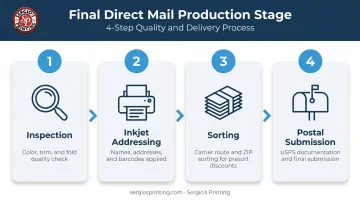
This stage determines your actual in-home delivery date and final postage cost. First-Class Mail delivers in 1–5 days. USPS Marketing Mail typically takes 3–10 business days and carries no delivery guarantee — factor that into campaign timing.
Key Factors That Affect Quality and Cost
Paper Stock and Coatings
Paper weight and coating type affect two things: print quality and postage cost. Heavier stocks produce sharper images and a more premium feel — but they add weight, which can push a piece into a higher postage tier.
Coated stocks (gloss, satin, or matte coated) hold ink on the surface rather than absorbing it, producing crisper color. Uncoated stock absorbs ink, which softens color reproduction but suits text-heavy pieces like letters.
USPS confirms that heavier mail generally costs more to mail, with the effect most pronounced for First-Class flats.
Color Mode and Ink
Direct mail prints in CMYK — not RGB. Submitting an RGB file is one of the most common causes of color shifts between the screen version and the printed piece. Monitors display additive light; presses use subtractive ink. The conversion is never exact, and bright screen colors often shift or dull.
To avoid surprises:
- Build all artwork in CMYK from the start
- Use PMS spot colors only when exact brand colors are required — they add cost due to extra plates and press setup
- Request a press proof for high-stakes campaigns before committing to a full run
Print Quantity and Method Match
Mismatching method to quantity is a straightforward cost error:
- Digital for 50,000 pieces — unnecessarily expensive per unit
- Offset for 500 pieces — plate setup cost makes per-unit cost prohibitive
Most printers offer pricing at quantity breaks, so ordering slightly above a threshold often costs less per piece than ordering just under it. Sergio's Printing's postcard pricing, for example, scales across 11 quantity tiers from 250 to 10,000 units, with per-unit cost decreasing at each step.
Variable Data Printing (VDP)
Any piece requiring unique per-recipient content — personalized names, customized offers, segment-specific images — requires digital printing with VDP capability. This cannot be done on a conventional offset press.
VDP works by merging a print-ready template with a data file, producing unique output for each record in a single press run. For it to work correctly:
- The mailing list must be clean, deduplicated, and properly segmented
- Data field names in the list must match the variable fields in the template
- Any missing or malformed records will produce unusable printed pieces
USPS Size and Format Compliance
Non-compliant pieces can be returned, rejected, or charged at a higher postage rate. Key USPS dimension standards:
| Format | Minimum | Maximum | Weight Limit |
|---|---|---|---|
| Postcard (card price) | 3.5" × 5" × 0.007" | 4.25" × 6" × 0.016" | — |
| Letter | 3.5" × 5" × 0.007" | 6.125" × 11.5" × 0.25" | 3.5 oz |
| Flat/large envelope | Exceeds letter max | 12" × 15" × 0.75" | 13 oz (First-Class) |
| Folded self-mailer | 3.5" × 5" | 6" × 10.5" | 3 oz |
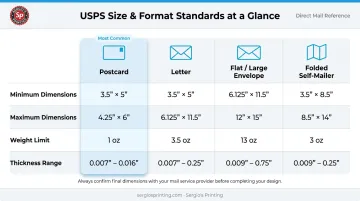
Letters must also maintain an aspect ratio between 1.3 and 2.5 (length ÷ height) to qualify for letter-class rates. Confirm dimensions before the design stage, not after printing.
Current First-Class retail rates (effective April 26, 2026): postcards $0.61, letters from $0.78, large envelopes/flats from $1.63.
A July 2026 price change is scheduled. Verify current rates with USPS before submitting a job.
Common Issues and Misconceptions
"Digital printing is always the cheaper option."
Digital eliminates plate costs and is more economical for short runs. At high volumes, its per-unit cost is consistently higher than offset. Businesses that assume digital is always more affordable routinely overspend on large campaigns.
"An approved design is a print-ready file."
A design that looks correct on screen is not necessarily ready to print. Screen files are typically RGB, low DPI, and lack bleeds. A print-ready file is a specific technical deliverable with four non-negotiable requirements:
- CMYK color mode (not RGB)
- 300 DPI minimum image resolution
- 0.125" bleed on all sides
- Embedded fonts throughout
Submitting anything less causes preflight failures, revision delays, and added cost.
"A screen proof is equivalent to a hard proof."
Monitor calibration, ambient lighting, and screen color profiles do not replicate printed ink on paper. For color-critical campaigns, approve a physical proof before authorizing full production — screen approvals alone regularly produce finished pieces that miss the mark.
Frequently Asked Questions
What is the direct mail print process?
It is the end-to-end production workflow for creating physical marketing mail — from concept and design through preflight, printing, finishing, and postal delivery. Businesses use it to reach targeted audiences with tangible, branded pieces that comply with USPS mailing standards.
What is the difference between offset and digital printing for direct mail?
Offset uses plates and becomes cost-effective for high-volume runs with consistent output. Digital requires no plates, supports variable data personalization per piece, and is better suited for shorter runs or campaigns requiring recipient-specific content.
How long does the direct mail print process typically take?
Digital print jobs generally take 3–7 business days after file approval. Offset jobs with finishing typically take 7–15 business days. USPS delivery adds 1–5 days for First-Class Mail or 3–10 business days for Marketing Mail once the job is submitted.
What file format should I submit for direct mail printing?
Submit a print-ready PDF with CMYK color mode, 300 DPI image resolution, 0.125" bleed on all sides, and all fonts embedded. Files meeting these specifications upfront prevent delays during preflight. Templates from Sergio's Printing come pre-configured with correct bleed and trim dimensions for each format.
How much does direct mail printing cost?
Cost depends on print quantity, piece size, paper stock, color specifications, finishing options, and postage class. Request a quote with all project specifications confirmed. Pricing shifts at quantity breaks, so confirming details upfront gets you an accurate number.
What is variable data printing in direct mail?
VDP is a digital printing technique that produces unique per-recipient content — personalized names, addresses, or customized offers — from a merged data file, all in a single print run. It requires a clean mailing list and is used to increase relevance and response rates in targeted campaigns.